 English
 Български
SEO Content Writing: How to Write Articles That Rank (2026)
SEO content writing is writing pages that answer what people search for, so clearly and so completely that Google wants to show them and readers want to act on them. This guide is for marketers, business owners who write their own blog, and freelance writers. By the end you’ll know how to plan a piece, structure it, place keywords without forcing them, handle images, write for AI search, and keep content ranking after it’s published. There’s a free content brief template and a checklist to download along the way.
What Is SEO Content Writing?
SEO content writing is the practice of creating web content that matches a specific search query, answers it better than the pages already ranking, and is structured so search engines and AI tools can understand and quote it. It combines three skills: knowing what people search for, writing clearly for them, and presenting the answer in a form search engines can read.
SEO writing is not about repeating a keyword. Google’s systems understand topics, synonyms and intent. What they reward is content that is genuinely useful to the person searching. SEO content writing is how you make that usefulness obvious.
SEO writing vs SEO copywriting
The two terms get used interchangeably, but they describe different jobs:
| SEO content writing | SEO copywriting | |
|---|---|---|
| Goal | Inform and earn trust | Persuade and convert |
| Page types | Guides, blog posts, explainers, comparisons | Service pages, product pages, landing pages |
| Main metric | Rankings, impressions, time on page | Enquiries, sales, sign-ups |
| Example | “How to choose a roofing contractor” | “Commercial roof repair in Denver” |
Most businesses need both. A guide brings people in, and a strong service page turns them into customers. This article focuses on the first job, but most of the principles apply to both.
Before You Write: Keyword, Intent and Brief
Most weak content is weak before the first sentence is written. The writer didn’t know exactly what search the page was for, or what the reader expected to find.
Choose one primary keyword per page
Every page should target one main search, plus a handful of closely related ones. If two of your pages chase the same keyword, they compete with each other and both rank worse. This is called cannibalization.
A quick check: search your keyword and its close variations. If Google shows mostly the same results for both, they belong on one page. If the results are different, they need separate pages. Our guide to keyword research covers this in detail, with a real worked example.
Read the search results to match search intent
Search intent is what the person actually wants when they type a query. The fastest way to find it is to look at what already ranks, because Google has already tested what satisfies people.
| If the results show… | The intent is… | Write… |
|---|---|---|
| Step-by-step guides | How-to | Numbered steps, one action each |
| “Best X” lists | Comparing options | A list with clear criteria |
| “X vs Y” pages | Choosing between two | A comparison table, then a verdict |
| Definitions and explainers | Understanding | A definition first, then depth |
| Product or service pages | Buying | A service or product page, not a blog post |
If Google shows service pages and you write a blog post, you’ll struggle to rank, however good the post is.
Write a content brief
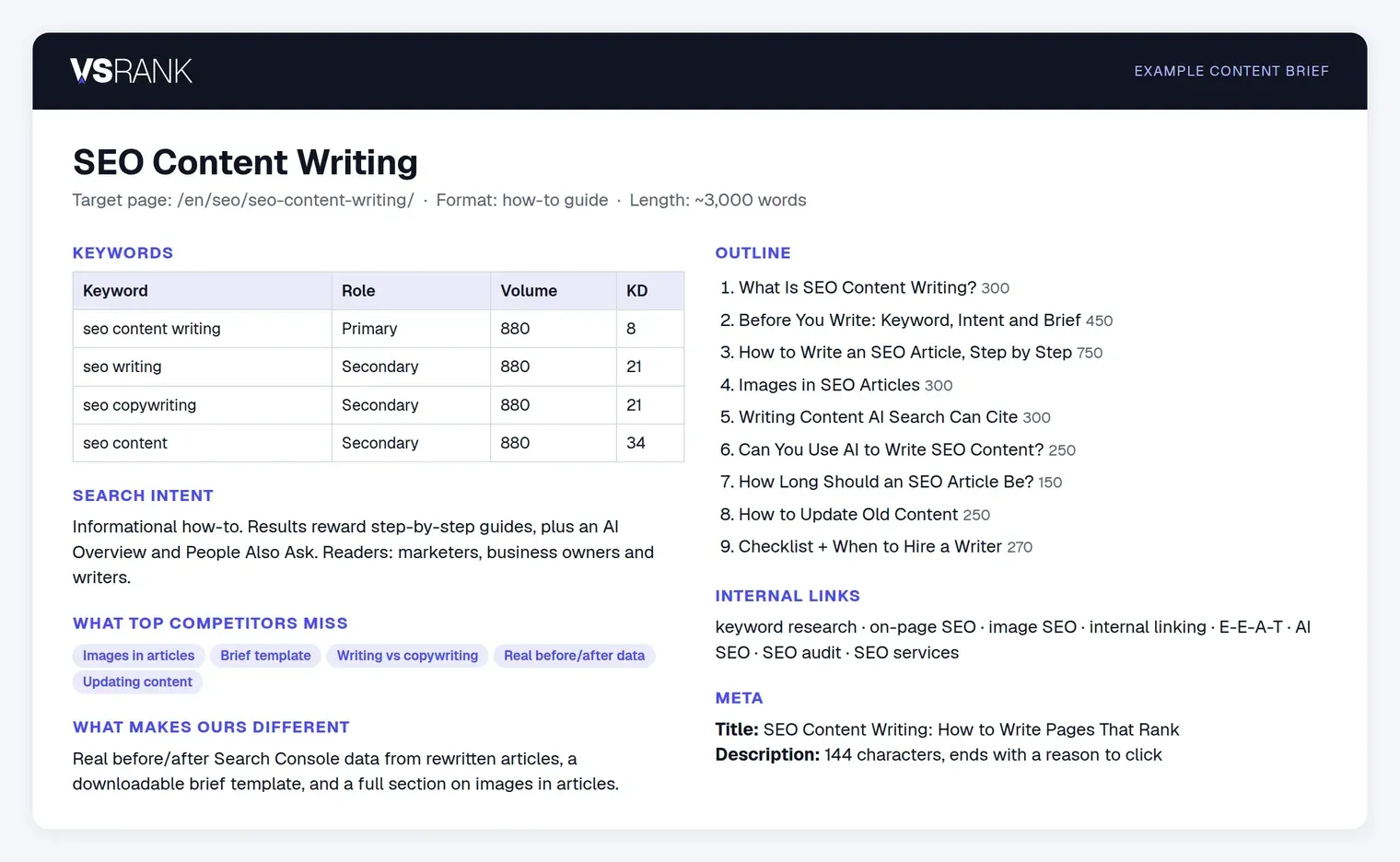
A content brief is a one-page plan for an article. It saves hours of rewriting and keeps writers, editors and clients aligned. Ours includes:
- Primary and secondary keywords, with search volume and difficulty
- Search intent and the format the results reward
- The top competing pages, what they cover and what they miss
- The outline, with a word count for each section
- Internal links to include, with anchor text
- What makes this piece different: the data, examples or experience no one else has
- Title tag and meta description
The last point matters most. If you can’t say what your article adds that the top five results don’t, you aren’t ready to write it.
Here’s what a filled-in brief looks like, for the article you’re reading now:
Download our free content brief template: PDF or editable Word document.
How to Write an SEO Article, Step by Step
- Write a headline and intro that answer the question
- Structure the page with clear headings
- Keep it readable
- Place keywords where they matter
- Add proof
- Link to related pages
- Write the title tag and meta description
 Seven steps from a blank page to an article that ranks
1. Write a headline and intro that answer the question
Your H1 should contain the primary keyword and make a clear promise. Your first paragraph should deliver the core answer, or at least make it obvious the answer is coming. Readers decide in seconds whether a page is worth their time, and AI tools often quote the first clear answer they find.
Put the primary keyword in the first 100 words, naturally. Don’t open with a story about the history of the internet.
2. Structure the page with clear headings
Use one H1, then H2s for the main sections and H3s inside them. Each heading should tell the reader what the section answers, and the first sentence under it should answer it. Someone skimming only your headings should understand the whole article.
This is also what makes content easy for Google to pull into featured snippets and for AI tools to cite. A self-contained section with a clear heading is easy to quote.
3. Keep it readable
Short paragraphs, two to four sentences each. Plain words. One idea per paragraph. Use lists for steps and options, and tables for comparisons. If a sentence needs to be read twice, rewrite it.
Readability isn’t a direct ranking factor, but people who can’t follow a page leave it, and pages that don’t satisfy searchers don’t keep their rankings.
4. Place keywords where they matter
The primary keyword belongs in five places: the title tag, the H1, the URL, the meta description and the first 100 words. After that, write naturally. Use synonyms and related terms because they make the text read better, not to hit a target.
There is no ideal keyword density, and you can ignore any advice about “LSI keywords”. Google’s John Mueller has said plainly that there’s no such thing. Repeating a keyword does nothing except make the text worse to read.
5. Add proof
This is where most content fails, and where you can win. Generic advice is everywhere, and AI can produce it in seconds. What can’t be copied is evidence:
- First-hand experience: what happened when you did the thing
- Your own data: numbers from your business, clients or tests
- Named examples: real companies, real pages, real results
- Cited sources: statistics with a source and a date
Google’s guidance on helpful content puts weight on experience and trust for exactly this reason. Read more about it in our guide to E-E-A-T.
6. Link to related pages
Add three to five links to other relevant pages on your site, using anchor text that describes the destination. “Read our internal linking guide” is useful. “Click here” isn’t. Links help readers go deeper and help Google understand how your content fits together.
7. Write the title tag and meta description
The title tag is what appears as the blue link in search results. Keep it around 50–60 characters, put the keyword near the front, and make it worth clicking. The meta description doesn’t affect rankings, but it affects whether people click. Aim for 130–150 characters that expand on the title and end with a reason to read. See our guide to on-page SEO for the full detail.
Images in SEO Articles
Images make content easier to follow and can bring traffic from Google Images, but most articles use them badly.
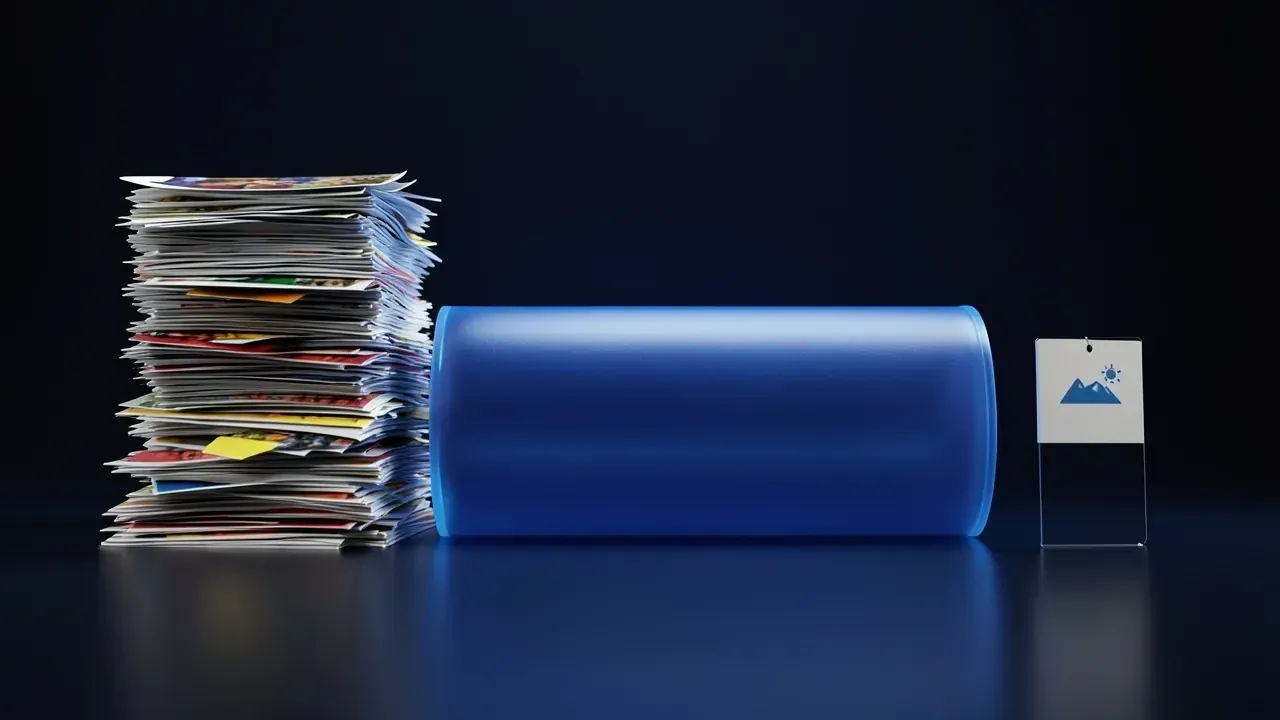 Large camera photos should leave as small, well-named web images
Do:
- Use original screenshots, diagrams and photos. They add information; stock photos rarely do.
- Place each image next to the text it explains.
- Name files descriptively:
seo-content-brief-example.png, notIMG_4021.png. - Write alt text that describes the image for someone who can’t see it.
- Compress images and use modern formats like WebP or AVIF.
- Set the image’s width and height so the page doesn’t jump while loading.
Don’t:
- Stuff keywords into alt text. Alt text is for accessibility, not rankings.
- Upload photos straight from a camera. In one audit, an interior design studio’s pages we audited weighed between 23 and 69 MB because of uncompressed images.
- Add images just to break up text if they don’t show anything.
Our image SEO guide covers formats, compression and Google Images in depth.
Writing Content AI Search Can Cite
Google’s AI Overviews, ChatGPT and Perplexity answer many questions directly and cite a few sources. Content gets cited when it makes a specific point clearly enough to be quoted on its own.
 A self-contained passage is what an AI answer can lift and cite
That means:
- Answer first. Put the direct answer in the first sentence of each section.
- Self-contained passages. A paragraph of 40–80 words that makes sense without the paragraphs around it.
- Specific facts. Numbers, names and dates, with sources.
- Clear entities. Name the product, place or company, rather than “it” or “this tool”.
- Tables and lists. Structured information is easy to extract.
Here’s the difference in practice:
Before: “There are lots of things to think about when it comes to how long your content should be, and it really depends on a variety of factors.”
After: “There’s no ideal word count for SEO. Cover the topic as fully as the top-ranking pages do, then add what they’re missing. For most how-to guides, that’s 1,500 to 3,000 words.”
The second version can be quoted. The first can’t. Learn more in our AI SEO guide.
Can You Use AI to Write SEO Content?
Yes, with care. Google’s position is that it rewards helpful, original content regardless of how it’s produced, but that using automation to mass-produce pages mainly to manipulate rankings breaks its spam policies. Since March 2024, Google has called this “scaled content abuse”.
In practice, AI is useful for:
- Turning research into a first outline
- Drafting sections you then rewrite with your own knowledge
- Editing for clarity, grammar and length
- Generating title and meta description options
And it causes problems when:
- It invents facts, statistics or sources. Always verify.
- It produces the same generic advice as everyone else.
- It’s used to publish hundreds of thin pages quickly.
Our own policy: AI can help us draft and edit, but every fact is checked, every example comes from real work, and a person with experience in the topic writes and signs off the final version.
How Long Should an SEO Article Be?
There is no ideal length. Cover the topic as completely as the pages already ranking do, then go further where they’re thin.
A real example: when we researched this article, the page ranking first for “seo content writing” was a short article of roughly 950 words, most of it older advice. It ranks because of the strength of the website it sits on, not its length. Length doesn’t win on its own, and neither does a famous domain forever. Usefulness wins over time.
Check what ranks, note the typical length, and write what the topic needs, not a number.
How to Update Old Content
Content decays. Facts go out of date, competitors publish better pages, and search intent shifts. Updating an existing page is often faster than writing a new one, because it already has history and links.
When to update:
- Impressions or clicks in Google Search Console have been falling for several months
- The page ranks in positions 8 to 20, close to page one but not on it
- Facts, prices, screenshots or dates are out of date
What to do:
- Search the keyword again and check whether the intent has changed.
- Update facts, examples and the “last updated” date.
- Add the sections that now-ranking pages cover and yours doesn’t.
- Improve the title tag if the click-through rate is low.
- Request indexing in Search Console.
Here’s what that looks like on a real site. In August 2026 we rewrote 20 existing articles on a SaaS company’s blog, then around 20 more. The chart shows Google Search Console data for the rewritten articles only. The dotted line marks the first rewrite, on August 19.
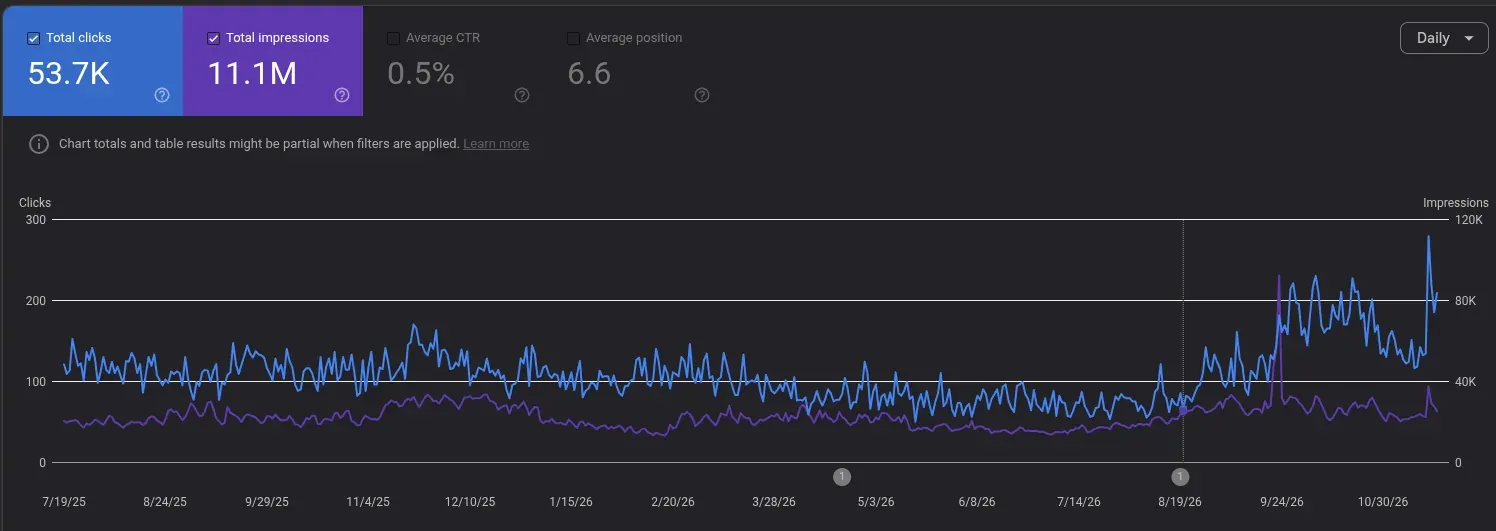
In the months before the rewrite, the articles had been slowly losing clicks, down to roughly 70–100 a day. About five weeks after the rewrite, they were getting roughly 150–220 clicks a day, with peaks near 280. Impressions rose far less than clicks did. The articles weren’t just appearing more often: people who saw them were much more likely to click. That’s the effect of better titles, clearer answers and content that matches what searchers want.
A regular SEO audit will flag which pages need attention first.
SEO Content Writing Checklist
Before you publish, check that:
- The page targets one primary keyword that no other page on your site targets
- The format matches what already ranks for that keyword
- The primary keyword is in the title tag, H1, URL, meta description and first 100 words
- The first paragraph answers the main question
- Every H2 is answered in its first sentence
- Paragraphs are short and the page is easy to skim
- It includes something competitors don’t: data, examples or experience
- Every statistic has a source and a date
- It links to 3–5 related pages with descriptive anchor text
- Images are original, compressed, named descriptively and have useful alt text
- Facts and claims written with AI help have been checked
- The title tag is around 50–60 characters and the meta description 130–150
- The author and date are shown
- You’ve set a reminder to review the page in 6–12 months
Download the checklist as a PDF.
When to Hire an SEO Content Writer
Writing content yourself works when you have the time and know the subject. It’s time to get help when:
- You know what to write about but never find the time to publish consistently
- Your content gets published but doesn’t rank, and you don’t know why
- You need content in areas where you lack expertise, or at a volume you can’t produce
When you hire, look for writers who ask about your customers and your expertise before they ask about keywords. Content optimization and implementation are part of our SEO services if you’d like a team to handle it.
The Bottom Line
Good SEO content writing is useful writing, made easy to find. Pick one clear search, find out what the searcher really wants, give them a better answer than anyone else with evidence only you can provide, and structure it so both people and machines can follow it.
This guide is part of our complete guide to SEO for business, which covers every area of SEO and links to a detailed guide for each.
About the author: Valentin Staykov is the founder of VS Rank. A software developer since 2020 and an SEO specialist since 2024, he has worked with local service businesses, e-commerce brands, an interior design studio and SaaS companies. More about Valentin.


